About :Oracle Apps(E-Business Suite), Oracle Application Framework (OAF), Application Development Framework (ADF) / ADF Mobile
Tuesday, March 10, 2015
Monday, March 09, 2015
OAF - Parameterized Popup
In this article, i will show you how to implement a parameterized popUp in OAF Page.
Region Style : PopUp is available only from R12.1.3 Ebiz.
Iam considering the below requirement to work on the functionality of popUp region.
BC4J Object List :
EmpVO
DeptVO --> parameterized with DeptID
Pages:
HelloPopUPPG.xml (Shows the employee details)
HelloPopUpCO
DeptRN.xml (Shows the Dept Details) -- Shared Region
Final Result
In this article, i will show you how to implement a parameterized popUp in OAF Page.
Region Style : PopUp is available only from R12.1.3 Ebiz.
Iam considering the below requirement to work on the functionality of popUp region.
BC4J Object List :
EmpVO
DeptVO --> parameterized with DeptID
Pages:
HelloPopUPPG.xml (Shows the employee details)
HelloPopUpCO
DeptRN.xml (Shows the Dept Details) -- Shared Region
Final Result
Sunday, March 01, 2015
OAF Integration with XML Report (Merge Multiple VO's)
In this sample, you will get to know how to merge multiple VO's into single XMLDocument and pass this input to RTF Template using : TemplateHelpder API to get the desired output.
RTF Template

Make sure you get the xdo files from $JAVA_TOP and move them in your myclasses of Jdeveloper
Below is the logic of the controller for the buttons in the page :
/*===========================================================================+
| Copyright (c) 2001, 2005 Oracle Corporation, Redwood Shores, CA, USA |
| All rights reserved. |
+===========================================================================+
| HISTORY |
+===========================================================================*/
package xxsri.oracle.apps.fnd.webui;
import java.io.ByteArrayInputStream;
import java.io.ByteArrayOutputStream;
import javax.servlet.ServletOutputStream;
import javax.servlet.http.HttpServletResponse;
import oracle.apps.fnd.common.VersionInfo;
import oracle.apps.fnd.framework.OAException;
import oracle.apps.fnd.framework.server.OADBTransactionImpl;
import oracle.apps.fnd.framework.webui.OAControllerImpl;
import oracle.apps.fnd.framework.webui.OAPageContext;
import oracle.apps.fnd.framework.webui.beans.OAWebBean;
import oracle.apps.xdo.oa.schema.server.TemplateHelper;
import oracle.cabo.ui.data.DataObject;
import oracle.jbo.XMLInterface;
import oracle.xml.parser.v2.XMLDOMException;
import oracle.xml.parser.v2.XMLDocument;
import oracle.xml.parser.v2.XMLElement;
import oracle.xml.parser.v2.XMLNode;
import xxsri.oracle.apps.fnd.server.DeptVOImpl;
import xxsri.oracle.apps.fnd.server.EmpVOImpl;
import xxsri.oracle.apps.fnd.server.XXSriBizzServicesAMImpl;
/**
* Controller for ...
*/
public class XMLReportWithMultipleVOCO extends OAControllerImpl
{
public static final String RCS_ID="$Header$";
public static final boolean RCS_ID_RECORDED =
VersionInfo.recordClassVersion(RCS_ID, "%packagename%");
/**
* Layout and page setup logic for a region.
* @param pageContext the current OA page context
* @param webBean the web bean corresponding to the region
*/
public void processRequest(OAPageContext pageContext, OAWebBean webBean)
{
super.processRequest(pageContext, webBean);
}
/**
* Procedure to handle form submissions for form elements in
* a region.
* @param pageContext the current OA page context
* @param webBean the web bean corresponding to the region
*/
public void processFormRequest(OAPageContext pageContext, OAWebBean webBean)
{
super.processFormRequest(pageContext, webBean);
if(pageContext.getParameter("generateXML")!=null)
{
getXMLDocument(pageContext,webBean);
}
//generateReport
else if (pageContext.getParameter("generateReport")!=null)
{
XMLDocument xmlDocObj = getXMLDocument(pageContext,webBean);
System.out.println("GEnerate Report Is Clicked");
// Get the HttpServletResponse object from the PageContext. The report output is written to HttpServletResponse.
DataObject sessionDictionary = (DataObject)pageContext.getNamedDataObject("_SessionParameters");
HttpServletResponse response = (HttpServletResponse)sessionDictionary.selectValue(null,"HttpServletResponse");
try {
ServletOutputStream os = response.getOutputStream();
// Set the Output Report File Name and Content Type
String contentDisposition = "attachment;filename=PerPopleData.html";
response.setHeader("Content-Disposition",contentDisposition);
response.setContentType("application/html");
// Get the Data XML File as the XMLNode
ByteArrayOutputStream outputStream = new ByteArrayOutputStream();
xmlDocObj.print(outputStream);
System.out.println("Output Stream-->");
System.out.println(outputStream.toString());
ByteArrayInputStream inputStream = new ByteArrayInputStream(outputStream.toByteArray());
ByteArrayOutputStream outputStreamFle = new ByteArrayOutputStream();
//Generate the PDF Report.
//Process Template
TemplateHelper.processTemplate(
((OADBTransactionImpl)pageContext.getApplicationModule(webBean).getOADBTransaction()).getAppsContext(),
"FND",//APPLICATION SHORT NAME
"XXCUS_EMP_DEPT_REP", //TEMPLATE_SHORT_CODE
((OADBTransactionImpl)pageContext.getApplicationModule(webBean).getOADBTransaction()).getUserLocale().getLanguage(),
((OADBTransactionImpl)pageContext.getApplicationModule(webBean).getOADBTransaction()).getUserLocale().getCountry(),
inputStream,
TemplateHelper.OUTPUT_TYPE_HTML,
null,
outputStreamFle);
//TemplateHelper.
// Write the PDF Report to the HttpServletResponse object and flush.
byte[] b = outputStreamFle.toByteArray();
response.setContentLength(b.length);
os.write(b, 0, b.length);
os.flush();
os.close();
outputStreamFle.flush();
outputStreamFle.close();
}
catch(Exception e)
{
response.setContentType("text/html");
throw new OAException(e.getMessage(), OAException.ERROR);
}
pageContext.setDocumentRendered(true);
}
}
public XMLDocument getXMLDocument(OAPageContext pageContext, OAWebBean webBean)
{
XMLDocument exportDoc = new XMLDocument();
XMLElement root = (XMLElement)exportDoc.createElement("RootNode");
XXSriBizzServicesAMImpl am = (XXSriBizzServicesAMImpl)pageContext.getApplicationModule(webBean);
XMLNode adbpaXMLNode = getEmpVOXMLData(pageContext,webBean);
XMLNode sysDateXMLNode =getDeptVOXMLData(pageContext,webBean);
appendChild(exportDoc,root,adbpaXMLNode);
appendChild(exportDoc,root,sysDateXMLNode);
exportDoc.appendChild(root);
ByteArrayOutputStream bo = new ByteArrayOutputStream() ;
try
{
exportDoc.print(bo);
}
catch(Exception ex)
{
ex.printStackTrace();
}
System.out.println("Final XML Docu-->"+ bo.toString());
return exportDoc ;
}
public XMLNode getEmpVOXMLData(OAPageContext pageContext, OAWebBean webBean)
{
XXSriBizzServicesAMImpl am = (XXSriBizzServicesAMImpl)pageContext.getApplicationModule(webBean);
EmpVOImpl vo = am.getEmpVO1();
vo.executeQuery();
XMLNode xmlNode = (XMLNode) vo.writeXML(1, XMLInterface.XML_OPT_ALL_ROWS);
ByteArrayOutputStream outputStream = new ByteArrayOutputStream();
System.out.println("getEmpVOXMLData"+ vo.getRowCount());
return xmlNode;
}
public XMLNode getDeptVOXMLData(OAPageContext pageContext, OAWebBean webBean)
{
XXSriBizzServicesAMImpl am = (XXSriBizzServicesAMImpl)pageContext.getApplicationModule(webBean);
DeptVOImpl vo = am.getDeptVO1();
vo.executeQuery();
XMLNode xmlNode = (XMLNode) vo.writeXML(1, XMLInterface.XML_OPT_ALL_ROWS);
ByteArrayOutputStream outputStream = new ByteArrayOutputStream();
System.out.println("getDeptVOXMLData"+ vo.getRowCount());
return xmlNode;
}
public void appendChild(XMLDocument doc, XMLNode parent, XMLNode child)
{
try
{
if(parent!=null)
parent.appendChild(child);
else
doc.appendChild(child);
}
catch(XMLDOMException e)
{
try{
doc.adoptNode(child);
if(parent!=null)
parent.appendChild(doc.adoptNode(child));
else
doc.appendChild(child);
}
catch(Exception ex) {}
}
}
}
Thursday, February 26, 2015
Auto-Repeating Layout (ARL) - in OAF
One of the very good feature to display a region multiple times.
As most of them aware of Table/ HGrid to display multiple records, but there is also a container to show the data repeatedly based on the VO applied.
Please find the below screenshot for same.
PG.xml Properties
One of the very good feature to display a region multiple times.
As most of them aware of Table/ HGrid to display multiple records, but there is also a container to show the data repeatedly based on the VO applied.
Please find the below screenshot for same.
PG.xml Properties
Monday, February 23, 2015
Attribute Level Validations in OAF
You Can use the below method in EOImpl
protected void doDML(int operation, TransactionEvent e) {
super.doDML(operation, e);
String value= getEmail();
if (value==null)
{
throw new OAAttrValException(OAException.TYP_ENTITY_OBJECT,
getEntityDef().getFullName(), // entity name
getPrimaryKey(), // entity primary key
"Email", // attribute Name
value, // bad attribute value
"FND", // message application short name
"XXCUS_EMAIL_REQ"); //
}
}
You Can use the below method in EOImpl
protected void doDML(int operation, TransactionEvent e) {
super.doDML(operation, e);
String value= getEmail();
if (value==null)
{
throw new OAAttrValException(OAException.TYP_ENTITY_OBJECT,
getEntityDef().getFullName(), // entity name
getPrimaryKey(), // entity primary key
"Email", // attribute Name
value, // bad attribute value
"FND", // message application short name
"XXCUS_EMAIL_REQ"); //
}
}
Invoking Workflow From OAF Page
Use the below method in the processFormRequest , on based on the button event.
if(pageContext.getParameter("submit")!=null)
{
String PItemType = "XXHRWF";
String PProcess = "XXPROC";
oracle.jbo.domain.Number pitekKeyNo =
pageContext.getApplicationModule(webBean).getSequenceValue("XX_TEST_SEQ");
String PItemKey = pitekKeyNo.toString(); // This can be a random item key generated
OANavigation wf = new OANavigation();
// Now create Workflow Process
wf.createProcess(pageContext, PItemType, PProcess, PItemKey);
// Set Sales Order Number
wf.setItemAttrText(pageContext, PItemType, PItemKey,"XXATTRIB", "OPERATIONS");
// Start Workflow Process
wf.startProcess(pageContext, PItemType, PProcess, PItemKey);
}
Use the below method in the processFormRequest , on based on the button event.
if(pageContext.getParameter("submit")!=null)
{
String PItemType = "XXHRWF";
String PProcess = "XXPROC";
oracle.jbo.domain.Number pitekKeyNo =
pageContext.getApplicationModule(webBean).getSequenceValue("XX_TEST_SEQ");
String PItemKey = pitekKeyNo.toString(); // This can be a random item key generated
OANavigation wf = new OANavigation();
// Now create Workflow Process
wf.createProcess(pageContext, PItemType, PProcess, PItemKey);
// Set Sales Order Number
wf.setItemAttrText(pageContext, PItemType, PItemKey,"XXATTRIB", "OPERATIONS");
// Start Workflow Process
wf.startProcess(pageContext, PItemType, PProcess, PItemKey);
}
Sunday, February 15, 2015
Playing with conversion of dates
Frequently required script
Following code is used for the purpose of converting : Date Input in : String format into : java.sql.Date
private java.sql.Date stringToDate(String dateS) {
java.sql.Date sqlStartDate = null;
if (dateS != null && !"".equals(dateS)) {
String dateFormat = "yyyy-MM-dd";
SimpleDateFormat df = new SimpleDateFormat(dateFormat);
java.util.Date parsedDate1 = null;
{
try {
parsedDate1 = df.parse(dateS);
} catch (ParseException e) {
// TODO
}
sqlStartDate = new java.sql.Date(parsedDate1.getTime());
}
}
return sqlStartDate;
}
Following scrip tis used to convert String into oracle.jbo.domain.Date
private Date stringToDate(String dateS)
{
Date date=null;
if(dateS!=null && !"".equals(dateS) )
{
String dateFormat = "dd-MMM-yyyy";
SimpleDateFormat df = new SimpleDateFormat(dateFormat);
java.util.Date parsedDate1=null;
try
{
parsedDate1 = df.parse(dateS);
}
catch(ParseException e)
{
e.printStackTrace();
}
date = new Date(new Timestamp(parsedDate1.getTime()));
}
return date;
}
Frequently required script
Following code is used for the purpose of converting : Date Input in : String format into : java.sql.Date
private java.sql.Date stringToDate(String dateS) {
java.sql.Date sqlStartDate = null;
if (dateS != null && !"".equals(dateS)) {
String dateFormat = "yyyy-MM-dd";
SimpleDateFormat df = new SimpleDateFormat(dateFormat);
java.util.Date parsedDate1 = null;
{
try {
parsedDate1 = df.parse(dateS);
} catch (ParseException e) {
// TODO
}
sqlStartDate = new java.sql.Date(parsedDate1.getTime());
}
}
return sqlStartDate;
}
Following scrip tis used to convert String into oracle.jbo.domain.Date
private Date stringToDate(String dateS)
{
Date date=null;
if(dateS!=null && !"".equals(dateS) )
{
String dateFormat = "dd-MMM-yyyy";
SimpleDateFormat df = new SimpleDateFormat(dateFormat);
java.util.Date parsedDate1=null;
try
{
parsedDate1 = df.parse(dateS);
}
catch(ParseException e)
{
e.printStackTrace();
}
date = new Date(new Timestamp(parsedDate1.getTime()));
}
return date;
}
Tuesday, January 27, 2015
Wednesday, January 21, 2015
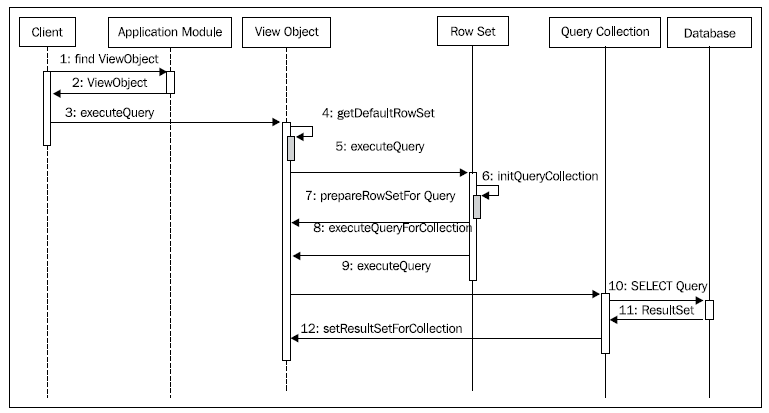
What happens when you execute an entity-based view object?
ViewObject vo = applicationModule.findViewObject("Departments");
vo.execute();//execute view object to fetch rows
Row row=vo.first();//Move to the first row in the row set
The following sequence diagram highlights how the business components interact
with one another to query the database:
Note : The above content is from : Jobinesh : Oracle ADF Real World Developer Guide a fantastic book on ADF.
Just shared the above for reference to others.
Saturday, November 08, 2014
OAF : Reading the data form the csv file and loading the data to table
PFR Logic :
if(pageContext.getParameter("save")!=null)
{
DataObject fileUploadData = (DataObject)pageContext.getNamedDataObject("FileUploadItem");
String fileName = null;
String contentType = null;
Long fileSize = null;
Integer fileType = new Integer(6);
BlobDomain uploadedByteStream = null;
BufferedReader in = null;
try
{
fileName = (String)fileUploadData.selectValue(null, "UPLOAD_FILE_NAME");
contentType = (String)fileUploadData.selectValue(null, "UPLOAD_FILE_MIME_TYPE");
uploadedByteStream = (BlobDomain)fileUploadData.selectValue(null, fileName);
in = new BufferedReader(new InputStreamReader(uploadedByteStream.getBinaryStream()));
fileSize = new Long(uploadedByteStream.getLength());
System.out.println("fileSize : " + fileSize);
System.out.println("fileName :"+fileName);
System.out.println("contentType :"+contentType);
} catch (NullPointerException ex)
{
throw new OAException("Please Select a File to Upload", OAException.ERROR);
}
writeLinesToVO(pageContext,webBean, in);
}
-----------------------
public void writeLinesToVO(OAPageContext pageContext, OAWebBean webBean , BufferedReader in )
{
xxlearn.oracle.apps.fnd.server.LearnAMImpl am = (xxlearn.oracle.apps.fnd.server.LearnAMImpl)pageContext.getApplicationModule(webBean);
XxcusCsvFileBlobEOVOImpl vo = am.getXxcusCsvFileBlobEOVO1() ;
XxcusCsvFileBlobEOVORowImpl row = null;
try
{
//Open the CSV file for reading
String lineReader = "";
long t = 0;
String[] linetext;
while (((lineReader = in.readLine()) != null))
{
//Split the deliminated data and
if (lineReader.trim().length() > 0)
{
System.out.println("lineReader" + lineReader.length());
linetext = lineReader.split(",");
t++;
int lineLength = linetext.length;
System.out.println("line text length is : " + lineLength);
if(lineLength ==3)
{
row = (XxcusCsvFileBlobEOVORowImpl)vo.createRow();
Number fileID = am.getOADBTransaction().getSequenceValue("XXCUS_CSV_FILE_ID_S");
row.setFileId(fileID);
row.setOrgcode(linetext[0]);
row.setSegment(linetext[1]);
row.setStatus(linetext[2]);
}
for (int k = 0; k < lineLength; k++)
{
System.out.println(linetext[k]);
} //for
}//if
} //while
am.getOADBTransaction().commit();
}//try
catch (IOException e)
{
}
throw new OAException("Data Saved Successfully", OAException.INFORMATION) ;
}
Database Table Structure
-----------------------------------------------------------------------------------------
CREATE TABLE xxcus_csv_file_blob
(
file_id INTEGER
, status varchar2(100)
,segment varchar2(100)
,orgcode varchar2(10)
,creation_date DATE
,created_by NUMBER
,last_update_date DATE
,last_updated_by INTEGER
,last_update_login INTEGER
,CONSTRAINT xxcus_csv_file_id PRIMARY KEY (file_id)
) ;
create sequence XXCUS_CSV_FILE_ID_S ;
-----------------------------------------------------------------------------------------
PS: Above coding is not totally mine, i copied from the below blog
http://rajubandam.blogspot.in/2014/01/uploading-csv-file-into-data-base-table.html
PFR Logic :
if(pageContext.getParameter("save")!=null)
{
DataObject fileUploadData = (DataObject)pageContext.getNamedDataObject("FileUploadItem");
String fileName = null;
String contentType = null;
Long fileSize = null;
Integer fileType = new Integer(6);
BlobDomain uploadedByteStream = null;
BufferedReader in = null;
try
{
fileName = (String)fileUploadData.selectValue(null, "UPLOAD_FILE_NAME");
contentType = (String)fileUploadData.selectValue(null, "UPLOAD_FILE_MIME_TYPE");
uploadedByteStream = (BlobDomain)fileUploadData.selectValue(null, fileName);
in = new BufferedReader(new InputStreamReader(uploadedByteStream.getBinaryStream()));
fileSize = new Long(uploadedByteStream.getLength());
System.out.println("fileSize : " + fileSize);
System.out.println("fileName :"+fileName);
System.out.println("contentType :"+contentType);
} catch (NullPointerException ex)
{
throw new OAException("Please Select a File to Upload", OAException.ERROR);
}
writeLinesToVO(pageContext,webBean, in);
}
-----------------------
public void writeLinesToVO(OAPageContext pageContext, OAWebBean webBean , BufferedReader in )
{
xxlearn.oracle.apps.fnd.server.LearnAMImpl am = (xxlearn.oracle.apps.fnd.server.LearnAMImpl)pageContext.getApplicationModule(webBean);
XxcusCsvFileBlobEOVOImpl vo = am.getXxcusCsvFileBlobEOVO1() ;
XxcusCsvFileBlobEOVORowImpl row = null;
try
{
//Open the CSV file for reading
String lineReader = "";
long t = 0;
String[] linetext;
while (((lineReader = in.readLine()) != null))
{
//Split the deliminated data and
if (lineReader.trim().length() > 0)
{
System.out.println("lineReader" + lineReader.length());
linetext = lineReader.split(",");
t++;
int lineLength = linetext.length;
System.out.println("line text length is : " + lineLength);
if(lineLength ==3)
{
row = (XxcusCsvFileBlobEOVORowImpl)vo.createRow();
Number fileID = am.getOADBTransaction().getSequenceValue("XXCUS_CSV_FILE_ID_S");
row.setFileId(fileID);
row.setOrgcode(linetext[0]);
row.setSegment(linetext[1]);
row.setStatus(linetext[2]);
}
for (int k = 0; k < lineLength; k++)
{
System.out.println(linetext[k]);
} //for
}//if
} //while
am.getOADBTransaction().commit();
}//try
catch (IOException e)
{
}
throw new OAException("Data Saved Successfully", OAException.INFORMATION) ;
}
Database Table Structure
-----------------------------------------------------------------------------------------
CREATE TABLE xxcus_csv_file_blob
(
file_id INTEGER
, status varchar2(100)
,segment varchar2(100)
,orgcode varchar2(10)
,creation_date DATE
,created_by NUMBER
,last_update_date DATE
,last_updated_by INTEGER
,last_update_login INTEGER
,CONSTRAINT xxcus_csv_file_id PRIMARY KEY (file_id)
) ;
create sequence XXCUS_CSV_FILE_ID_S ;
-----------------------------------------------------------------------------------------
PS: Above coding is not totally mine, i copied from the below blog
http://rajubandam.blogspot.in/2014/01/uploading-csv-file-into-data-base-table.html
Friday, November 07, 2014
PLSQL API to validate Oracle E-business Suite Login Credentials.
1. Call the below API to validate user/password details of Oracle E-Business Suite
FND_WEB_SEC.VALIDATE_LOGIN( '<userName>','<password>')
Ex : select FND_WEB_SEC.VALIDATE_LOGIN( 'OPERATIONS','welcome') from dual ;
Returns 'Y' -- if valid , else returns 'N'
1. Call the below API to validate user/password details of Oracle E-Business Suite
FND_WEB_SEC.VALIDATE_LOGIN( '<userName>','<password>')
Ex : select FND_WEB_SEC.VALIDATE_LOGIN( 'OPERATIONS','welcome') from dual ;
Returns 'Y' -- if valid , else returns 'N'
How to Invoke ADF Page From Oracle E-Business Suite. The following gives the step by step information about how to register. ( I have Used : Oracle E-Business Suite : R12.2.4)
Ebiz Login Screen
Target ADF Page à which is expected to
be called
http://localhost:7101/XXHelloADF-ViewController-context-root/faces/HelloWorldPG.jsf
Profile Name: External ADF Application URL
AOL Function Registration
Name XXCUS_ADF_HELLO_WORLD
Code XXCUS_ADF_HELLO_WORLD
Description ADF
Hello World Sample
HTML Call GWY.jsp?targetPage=faces/HelloWorldPG.jsf
Menu
Responsibility
Sunday, November 02, 2014
SQL/PLSQL Interview Questions.
- Perform SORT without Using ORDER BY Clause
select empno from emp
union
select 1 from dual where 1=10 ;
Friday, October 17, 2014
Logic to throw bundled attribute level validations in OAF
The following logic has to be added in the EOImpl.java
/**Add Entity validation code in this method.
*/
protected void validateEntity() {
super.validateEntity();
ArrayList errMsg = new ArrayList();
Number orgIDNo = getOrgId();
if (orgIDNo == null) // throwing Attribute Level Validation if the endDate is NULL
{
OAAttrValException ex1= new OAAttrValException(OAAttrValException.TYP_VIEW_OBJECT,
"ItemLinesEOVO1",
getPrimaryKey(),
"OrgId",
getAttribute("OrgId"),
"FND",
"XXCUS_ICRE_ORGID_NULL");
errMsg.add(ex1);
}
//'XXCUS_ICRE_TEMPLATE_ID_NULL'
Number templateID = getTemplateId();
if (templateID == null) // throwing Attribute Level Validation if the endDate is NULL
{
OAAttrValException ex2= new OAAttrValException(OAAttrValException.TYP_VIEW_OBJECT,
"ItemLinesEOVO1",
getPrimaryKey(),
"TemplateName",
getTemplateId(),
"FND",
"XXCUS_ICRE_TEMPLATE_ID_NULL");
errMsg.add(ex2);
}
OAAttrValException.raiseBundledOAAttrValException(errMsg);
}
The following logic has to be added in the EOImpl.java
/**Add Entity validation code in this method.
*/
protected void validateEntity() {
super.validateEntity();
ArrayList errMsg = new ArrayList();
Number orgIDNo = getOrgId();
if (orgIDNo == null) // throwing Attribute Level Validation if the endDate is NULL
{
OAAttrValException ex1= new OAAttrValException(OAAttrValException.TYP_VIEW_OBJECT,
"ItemLinesEOVO1",
getPrimaryKey(),
"OrgId",
getAttribute("OrgId"),
"FND",
"XXCUS_ICRE_ORGID_NULL");
errMsg.add(ex1);
}
//'XXCUS_ICRE_TEMPLATE_ID_NULL'
Number templateID = getTemplateId();
if (templateID == null) // throwing Attribute Level Validation if the endDate is NULL
{
OAAttrValException ex2= new OAAttrValException(OAAttrValException.TYP_VIEW_OBJECT,
"ItemLinesEOVO1",
getPrimaryKey(),
"TemplateName",
getTemplateId(),
"FND",
"XXCUS_ICRE_TEMPLATE_ID_NULL");
errMsg.add(ex2);
}
OAAttrValException.raiseBundledOAAttrValException(errMsg);
}
Friday, September 19, 2014
User Empowerment Framework -- An OAF Based Solution For : Oracle Ebiz
Friends,
I was one of the core developer of the OAF based solution
for : Oracle Ebiz.
Find more info @ : https://events.techmahindra.com/OracleOpenworld2014/User_Empowerment%20.aspx
Regards
Sridhar
Saturday, September 13, 2014
OAF - Oracle Application Framework - Frequently Used Items For User Action.
Following is the way you can catch the event for an item based on its item style.
SNO
|
Component Name(Item Style)
|
How to Catch the event in CO
|
1
|
submitButton
|
You can catch the submit button in two ways :
1. Here
: save is item id
if(pageContext.getParameter("save")!=null)
2. Here requestTypeAction
is the action event name mentioned on
the item in client Action (Action Type) if("requestTypeAction".equals(pageContext.getParameter(EVENT_PARAM)))
|
2
|
messageLovInput
|
if
(pageContext.isLovEvent())
{
String lovInputSourceId =
pageContext.getLovInputSourceId();
//checking which lov event is
fired.
//Below countryID is the ID of
messageLovInput
if
("countryID".equals(lovInputSourceId))
{
//Invokes AM Method
OAMessageLovInputBean
countryIDBean =
(OAMessageLovInputBean)webBean.findIndexedChildRecursive("countryID");
String countryID =
countryIDBean.getText(pageContext);
System.out.println("Country
ID Value-->"+ countryID);
}
}
|
3
|
messageChoice
|
Here requestTypeAction is the
action event name mentioned on the item in client Action (Action Type) if("requestTypeAction".equals(pageContext.getParameter(EVENT_PARAM)))
|
4
|
link(Hyperlink)
|
Here requestTypeAction is the
action event name mentioned on the item in client Action (Action Type) if("requestTypeAction".equals(pageContext.getParameter(EVENT_PARAM)))
|
5
|
Passing Parameters From One Page To Another
|
if(pageContext.getParameter("submit1")!=null)
{
HashMap hmap = new HashMap();
OAMessageStyledTextBean
headerBean = (OAMessageStyledTextBean)webBean.findIndexedChildRecursive("headerID");
String reqHeaderID =
headerBean.getText(pageContext);
hmap.put("p_headerID", reqHeaderID);
hmap.put("p_submit_msg","Y") ;
pageContext.setForwardURL(
"OA.jsp?page=/xxcus/oracle/apps/fnd/ear/webui/EmpCreateUpdateReqPG",
null,
OAWebBeanConstants.KEEP_MENU_CONTEXT,
null,
hmap,
true,
OAWebBeanConstants.ADD_BREAD_CRUMB_NO,
OAWebBeanConstants.IGNORE_MESSAGES);
}
|
Method : oapagecontext.getParameter("event"); returns the current event name
Friday, September 12, 2014
Thursday, September 11, 2014
Oracle Application
Framework Developer's Guide (OAF Dev Guide Mos Links)
The Oracle
Application Framework Developer's Guide is available in three formats:
- As a PDF file from My Oracle
Support (MOS).
- As Oracle Help for Java in
JDeveloper with OA Extension.
- As WebHelp, packaged in
jdevdoc.zip and shipped with each release of Oracle Application Framework.
To
download the PDF file of the Oracle Application Framework Developer's
Guide for a given release, select one of the following Document links:
- Release 12.2.4, Document 1676216.1
- Release 12.2.3, Document 1593765.1
- Release 12.2, Document 1303462.1
- Release 12.1.3, Document 1107973.1
- Release 12.1.2, Document 972774.1
- Release 12.1 to Release 12.1.1, Document 744832.1
- Release 12.0.6, Document 744831.1
- Release 12 to Release 12.0.4, Document 394780.1
- Release 11.5.10 RUP7, Document 858398.1
- Release 11.5.10 RUP5 to Release
11.5.10 RUP6, Document 269138.1
List of File Types in : Oracle E-Business Suite
|
File Type
|
IDE Used For Development
|
|
Forms (.fmb files)
|
Oracle Forms Developer
|
|
Library (.pll files)
|
Oracle Forms Developer
|
|
Reports (.rdf files)
|
Oracle Report Builder
|
|
Java (.class files)
|
Jdeveloper
|
|
Java Server Pages (.jsp files)
|
Jdeveloper
|
|
Oracle Application Framework (OAF) Pages (.xml
files)
|
Jdeveloper – With OA Extension
|
|
Oracle Application Framework (OAF)
Personalizations (.xml files)
|
Oracle Ebusiness Instance
|
|
Workflow Definition (.wft files)
|
Oracle Workflow Builder
|
|
Workflow Business Event System Object
Definitions (.wfx files)
|
Oracle Workflow Builder
|
|
BI Publisher Reports - Layout template formats
|
MSWord
with BI Publisher Plugin
|
|
XML Style Sheets (.xsl files)
|
|
|
XML Publisher PDF templates (.pdf files)
|
|
|
XML Publisher Excel templates (.xls files)
|
|
|
XML Publisher RTF templates (.rtf files)
|
|
|
BI Publisher Reports - Data Definition formats
|
|
|
XML Publisher (XDO) XML (.xml files)
|
|
|
XML Schema Definition (.xsd files)
|
|
|
Product Family Name
|
Product Family
Abbreviation
|
Product Short names
|
|
Applications
Technology
|
ATG
|
AD, AK, ALR, AZ, BNE,
EC, ECX, FND, FRM, IZU, JTF, JTS, SHT, XDO
|
|
Projects
|
PJ
|
FPA, GMS, IPA, PA, PN
|
|
Financials
|
FIN
|
AMW, AP, AR, AX, CE,
CUA, FA, FUN, FV, GCS, GHG, GL, IA, IBY, IEX, IGC, IGI, IGW, IMC, IPM, ITA,
JA, JE, JG, JL, LNS, OKL, PSA, PSB, QRM, RG, XLA, XLE, XTR, ZX
|
|
Procurement
|
PRC
|
CHV, ICX, PO, POM,
PON, POS
|
|
Supply Chain
Management
|
SCM
|
AHL, BOM, CLN, CMI,
CRP, CSD, CSE, CSI, CZ, DDD, DDR, DNA, DOM, EAM, EDR, EGO, ENG, FLM, FTE,
GMA, GMD, GME, GMF, GMI, GML, GMO, GMP, GR, INL, INV, ITG, JMF, MFG, MRP,
MSC, MSD, MSO, MSR, MST, MTH, MWA, OE, OKC, OKE, OKS, OKX, ONT, PJM, QA, QP,
QPR, RLM, RRS, SHT, VEA, WIP, WMS, WPS, WSH, WSM, YMS
|
|
Human Resources Suite
|
HRMS
|
AME, BEN, DT, FF, GHR,
HXC, HXT, IRC, OTA, PAY, PER, PQH, PQP, PSP, SSP
|
|
Financial Services
Applications
|
FSA
|
FEM, FTP, PFT, ZFA,
ZPB, ZSA
|
|
Customer Relationship
Management
|
CRM
|
AMS, AMV, AS, ASF,
ASG, ASL, ASN, ASP, AST, CCT, CN, CS, CSC, CSF, CSL, CSM, CSP, CSR, CUG, DPP,
IBC, IBP, IBU, IEB, IEC, IEM, IEO, IES, IEU, JTM, OZF, PRP, PV, QOT, XDP,
XNB, XNP
|
Subscribe to:
Posts (Atom)