Tuesday, January 10, 2017

Basic Level Comparison of OAF vs ADF - MVC Layer Execution


Hello All,

In this i will try to highlight how the page execution happens and the framework differences between OAF and ADF.

Consider the below scenario :

Display Department Data in the output.

-----------------------------------------------------------------------------------------
From OAF Perspective
-----------------------------------------------------------------------------------------
-----------------------------------------------------------------------------------------
* Following files would be required to display the data.
Model
  SampleAM.xml
  SampleAMImpl.java
  DeptVO.xml
  DeptVOImpl.java

View  
   DeptDetailsPG.xml

CO 
   DeptpDetailsCO.java
-----------------------------------------------------------------------------------------
-----------------------------------------------------------------------------------------
From ADF Perspective

Model
  SampleAM.xml
  SampleAMImpl.java
  DeptVO.xml
  DeptVOImpl.java

View  
   DeptDetailsPG.xml
   DeptDetailsPG.jspx
   DeptDetailsPGPageDef.xml

CO 
   DeptpDetailsCO.java

-----------------------------------------------------------------------------------------
-----------------------------------------------------------------------------------------

OAF - How to iterate rows programatically in View Object (VO) - Using RowSet or RowSetIterator


There are different requirements which we generally come across to iterate the data from VO.

Following are different approaches - we can use to get the data from VO.

You can write the below logic in : AMImpl

//Using RowSetIterator Logic 

 public void initShowEmpData()
  {
    EmpEOVOImpl vo = getEmpEOVO1();
    EmpEOVORowImpl row = null;
   
    RowSetIterator rowIter = vo.createRowSetIterator("EmpIter");
   
    while(rowIter.hasNext())
     {
       row = (EmpEOVORowImpl)rowIter.next(); //FETCH INTO
       System.out.println("EmpNO-->"+ row.getEmpno()  + " Name-->"+ row.getEname()
         + " SelectFlag-->" + row.getselectFlag()      
        );
     
     }
     rowIter.closeRowSetIterator();
   
  }

//Using FilteredRows Logic to get the filtered rows.

    public void deleteSelectedRowsNew()
       {
         EmpEOVOImpl vo = getEmpEOVO1();
         EmpEOVORowImpl row = null;
       
         Row rows[]= vo.getFilteredRows("selectFlag","Y");
         
          int selectedRowLenth = rows.length;
         
           if(selectedRowLenth>0)
             {
             
                for(int i=0;i<selectedRowLenth;i++)
                  {
                    row = (EmpEOVORowImpl)rows[i];
                    row.remove();
                  }
               OAException infoMsg = new OAException("Deleted The Selected Rows--Count-->"+selectedRowLenth,
                              OAException.INFORMATION);
                              throw infoMsg;
               }
         
           else
            {
              OAException warningMsg = new OAException("Plese Select The Rows", OAException.WARNING);
              throw warningMsg;
            }
       
       }


//Using RowQualifier

       public void showEmpDataUsingRowQualifier()
     {
         EmpEOVOImpl vo = getEmpEOVO1();
         EmpEOVORowImpl row = null;
       
     System.out.println("Using --showEmpDataUsingRowQualifier Logic");
       
         oracle.jbo.server.RowQualifier rowQualifer = new RowQualifier(vo);
         rowQualifer.setWhereClause("Deptno= 10 and Job='SALESMAN'");
         Row rows[] = vo.getFilteredRows(rowQualifer) ;
       
         int selectedRowLenth = rows.length;
       
          if(selectedRowLenth>0)
            {
             
               for(int i=0;i<selectedRowLenth;i++)
                 {
                   row = (EmpEOVORowImpl)rows[i];
                 
                     System.out.println("EmpNO-->"+ row.getEmpno()  + " Name-->"+ row.getEname()
                       + " SelectFlag-->" + row.getselectFlag() );
                     
                 }
              }

     }


Sunday, November 06, 2016

OAF -How to get the current page name

OAF - CO Extension - Find the page name at run time.

I have come across a requirement for which i have to perform CO extension.

But there are two pages involved in which both of them are using same CO.

But i have to write a different logic for the pages.

So i have used the below logic to identify the page and wrote the logic accordingly.


Hope the below code helps..


//Code to get the page Name.


    String pageURL = pageContext.getCurrentUrl ();
    int lastIndex  = pageURL.lastIndexOf( '/' );;
    String finalPageNameStr = pageURL.substring(lastIndex + 1, pageURL.indexOf("&"));
    pageContext.writeDiagnostics(this,"Final Page Name -->" + finalPageNameStr,1);


  if (finalPageNameStr!=null && "pageNameA".equals(finalPageNameStr))
    {
 pageContext.writeDiagnostics(this," Inside Page A logic ",1);

}
 else  if (finalPageNameStr!=null && "pageNameB".equals(finalPageNameStr))
   {
  pageContext.writeDiagnostics(this," Inside Page B logic ",1);  
}


Friday, October 28, 2016

OAF - Set FireAction for DropDown Dynamically


  public void processRequest(OAPageContext pageContext, OAWebBean webBean)
  {
    super.processRequest(pageContext, webBean);
   
      super.processRequest(pageContext, webBean);
      AMCGBizzSericesAMImpl am = (AMCGBizzSericesAMImpl)pageContext.getApplicationModule(webBean);
      am.initEmpEOVO();
     
      System.out.println("PR Method of Main page RN");
     
      OAMessageChoiceBean deptPopIDBean = (OAMessageChoiceBean)webBean.findIndexedChildRecursive("deptPopID");
      deptPopIDBean.setFireActionForSubmit("DeptPop_EVENT",null,null,true);
  }

  /**
   * Procedure to handle form submissions for form elements in
   * a region.
   * @param pageContext the current OA page context
   * @param webBean the web bean corresponding to the region
   */
  public void processFormRequest(OAPageContext pageContext, OAWebBean webBean)
  {
    super.processFormRequest(pageContext, webBean);
   
      System.out.println("PFR Method of Main Page  RN");
     
      String eventParam = pageContext.getParameter(EVENT_PARAM);
       if(eventParam!=null && "DeptPop_EVENT".equals(eventParam))
        {
         throw new OAException("User Clicked on PopEvent");
        }


  }

Thursday, October 27, 2016


Oracle Cloud - Invoking REST Webservice (HCM Module)

Invoking REST web service Using: Advanced REST client (in chrome)

REST WebService URL : https://rws2-fapxxx-hcm.oracledemos.com/hcmCoreApi/resources/11.1.11/emps//?q=PersonNumber=715


Invoking REST  WebService using SOAP REST Client.


OAF Page Controller Flow , When Multiple CO's  are there.


Events are handled from mainRN to child RN.

Following is the log snippet for the same.


--Process Request Method
PR Method of Main Page  RN
PR Method of Shared RN


-- Process Form Request Method
PFR Method of Main Page  RN
PFR Method of Shared RN

Friday, September 30, 2016

OAF- Query to list all personalizations


Following query can be used to list all the personalizations of OAF using MDS Repository.

**But the problem with the below one, we cant be sure personalizations which are done by the business and as well as personalizations (vanilla) which are provided by oracle

*CREATED_BY column does not have any info any significance to validate if it is provided by oracle or done by business.

*business means : customization's done by developer for custom requirements.

select
jp.created_by,
jp.path_name, jp.path_docid
, jdr_mds_internal.getdocumentname(jp.path_docid) page_path
from jdr_paths jp where 1=1
AND jp.path_type='DOCUMENT'
AND jdr_mds_internal.getdocumentname(jp.path_docid)  like '/oracle/apps/%custo%'

Monday, July 18, 2016

Oracle AP Invoice Aging Report Query
------------------------------------------------

SELECT   org_name,
              vendor_name,
              vendor_number,
              vendor_site_details,
              invoice_number,
              invoice_date,
              gl_Date,
              invoice_type,
              due_date,
              past_due_days,
              amt_due_remaining,
              CASE
                 WHEN past_due_days >= -999 AND past_due_days < 0
                 THEN
                    amt_due_remaining
                 ELSE
                    0
              END
                 CURRENT_BUCKET,
              CASE
                 WHEN past_due_days >= 0 AND past_due_days <= 30
                 THEN
                    amt_due_remaining
                 ELSE
                    0
              END
                 BUCKET_0_30,
              CASE
                 WHEN past_due_days > 30 AND past_due_days <= 60
                 THEN
                    amt_due_remaining
                 ELSE
                    0
              END
                 BUCKET_31_60,
              CASE
                 WHEN past_due_days > 60 AND past_due_days <= 90
                 THEN
                    amt_due_remaining
                 ELSE
                    0
              END
                 BUCKET_61_90,
              CASE
                 WHEN past_due_days > 90 AND past_due_days <= 120
                 THEN
                    amt_due_remaining
                 ELSE
                    0
              END
                 BUCKET_91_120,
              CASE
                 WHEN past_due_days > 120 AND past_due_days <= 999999
                 THEN
                    amt_due_remaining
                 ELSE
                    0
              END
                 GREATER_THAN_120
       FROM   (SELECT   hou.name org_name,
                        pv.vendor_name vendor_name,
                        pv.segment1 vendor_number,
                        pvs.vendor_site_code || ' ' || pvs.city || ' ' || state
                           vendor_site_details,
                        i.invoice_num invoice_number,
                        i.payment_status_flag,
                        i.invoice_type_lookup_code invoice_type,
                        i.invoice_date Invoice_Date,
                        i.gl_date Gl_Date,
                        ps.due_date Due_Date,
                        (CEIL (SYSDATE - ps.due_date)) past_due_days, -- DAYS_DUE,
                        DECODE (
                           i.invoice_currency_code,
                           'USD',
                           DECODE (
                              0,
                              0,
                              ROUND (
                                 ( (NVL (ps.amount_remaining, 0)
                                    / (NVL (i.payment_cross_rate, 1)))
                                  * NVL (i.exchange_rate, 1)),
                                 2
                              ),
                              ROUND( ( (NVL (ps.amount_remaining, 0)
                                        / (NVL (i.payment_cross_rate, 1)))
                                      * NVL (i.exchange_rate, 1))
                                    / 0)
                              * 0
                           ),
                           DECODE (
                              i.exchange_rate,
                              NULL,
                              0,
                              DECODE (
                                 0,
                                 0,
                                 ROUND (
                                    ( (NVL (ps.amount_remaining, 0)
                                       / (NVL (ps.payment_cross_rate, 1)))
                                     * NVL (i.exchange_rate, 1)),
                                    2
                                 ),
                                 ROUND( ( (NVL (ps.amount_remaining, 0)
                                           / (NVL (i.payment_cross_rate, 1)))
                                         * NVL (i.exchange_rate, 1))
                                       / 0)
                                 * 0
                              )
                           )
                        )
                           amt_due_remaining
                 FROM   ap_payment_schedules_all ps,
                        ap_invoices_all i,
                        ap_suppliers pv,
                        ap_supplier_sites_all pvs,
                        ap_lookup_codes alc1,
                        hr_operating_units hou
                WHERE       i.invoice_id = ps.invoice_id
                        AND i.vendor_id = pv.vendor_id
                        AND i.vendor_site_id = pvs.vendor_site_id
                        AND i.org_id = hou.organization_id
                        AND i.cancelled_date IS NULL
                        --AND ps.amount_remaining = 0
                        AND (NVL (ps.amount_remaining, 0)
                             * NVL (i.exchange_rate, 1)) != 0
                        AND i.payment_status_flag IN ('N', 'P')
                        AND alc1.lookup_type(+) = 'INVOICE TYPE'
                        AND alc1.lookup_code(+) = i.invoice_type_lookup_code
                        --and    i.INVOICE_NUM ='358908411'
                        AND ap_invoices_pkg.get_approval_status (
                              i.invoice_id,
                              i.invoice_amount,
                              ps.payment_status_flag,
                              invoice_type_lookup_code
                           ) in('APPROVED','NEEDS REAPPROVAL'))
--                        AND i.org_id = fnd_profile.VALUE ('ORG_ID'))
where 1=1
ANd vendor_name IN ( 'Advantage Corp' ,'Capp Consulting' )
and invoice_number IN ('18-JAN-2007','AC0904','22-JUN-2007','25-JUL-2007')
   ORDER BY   2;

Wednesday, July 13, 2016

Oracle ERP Cloud - Invoke HCM REST WebService Using CURL


URL For List of HCM REST WebServices : https://docs.oracle.com/cloud/latest/jcs_gs/JSRMR/Use%20cURL.html


Command to invoke REST WebService

curl -i -u "<username>:<password>" -X GET https://<host>:<port>/hcmCoreApi/resources/latest/emps/
  Example :   curl  -k -i -u "CASEY.BROWN:Password" -X GET https://rws2-<xxno>-hcm.oracledemos.com/hcmCoreApi/resources/11.1.11/emps/

curl  -k -i -u "CASEY.BROWN:Password" -X GET https://rws2-<xxno>-hcm.oracledemos.com/hcmCoreApi/resources/11.1.11/emps//?q=PersonNumber=715

Following is the output :


Wednesday, July 22, 2015

SOAP / REST   these are the technologies required for the Fusion Technical Consultants.


Iam a newbie in this area : i just found following are the simple samples provided by the developers.

Expose ADB BC (EO,V) as REST  WebService

http://waslleysouza.com.br/en/2014/10/expose-adf-bc-restful-web-service/

Entity Based REST WebService

http://deepakcs.blogspot.in/2013/09/jdeveloper-12c-ejb-with-rest-webservice.htm

Wednesday, May 13, 2015

Way to Fusion 


The following posts lists down some set of links which are useful during Fusion Personalization.


Adding Attachments :

https://blogs.oracle.com/fadevrel/entry/getting_started_with_interacting_with

Tuesday, March 10, 2015

OAF VO Extension  Sample on iExpense page

You can find the source code @  https://drive.google.com/file/d/0B1HLsOv1s5WFdkxPNEV0QWZnaG8/view?usp=sharing


I hope the images are self explanatory.

Monday, March 09, 2015

OAF - Parameterized Popup

In this article, i will show you how to implement a parameterized popUp in OAF Page.

Region Style : PopUp is available only from R12.1.3 Ebiz.

Iam considering the below requirement to work on the functionality of popUp region.


BC4J Object List :

EmpVO
DeptVO --> parameterized with DeptID


Pages:
HelloPopUPPG.xml (Shows the employee details)
HelloPopUpCO

DeptRN.xml (Shows the Dept Details) -- Shared Region


Final Result


Sunday, March 01, 2015

OAF Integration with XML Report (Merge Multiple VO's)


In this sample, you will get to know how to merge multiple VO's into single XMLDocument and pass this input to RTF Template using : TemplateHelpder API to get the desired output.

RTF Template


Make sure you get the xdo files from $JAVA_TOP and move them in your myclasses of Jdeveloper


Below is the logic of the controller for the buttons in the page :


/*===========================================================================+
 |   Copyright (c) 2001, 2005 Oracle Corporation, Redwood Shores, CA, USA    |
 |                         All rights reserved.                              |
 +===========================================================================+
 |  HISTORY                                                                  |
 +===========================================================================*/
package xxsri.oracle.apps.fnd.webui;

import java.io.ByteArrayInputStream;
import java.io.ByteArrayOutputStream;

import javax.servlet.ServletOutputStream;
import javax.servlet.http.HttpServletResponse;

import oracle.apps.fnd.common.VersionInfo;
import oracle.apps.fnd.framework.OAException;
import oracle.apps.fnd.framework.server.OADBTransactionImpl;
import oracle.apps.fnd.framework.webui.OAControllerImpl;
import oracle.apps.fnd.framework.webui.OAPageContext;
import oracle.apps.fnd.framework.webui.beans.OAWebBean;

import oracle.apps.xdo.oa.schema.server.TemplateHelper;

import oracle.cabo.ui.data.DataObject;

import oracle.jbo.XMLInterface;

import oracle.xml.parser.v2.XMLDOMException;
import oracle.xml.parser.v2.XMLDocument;
import oracle.xml.parser.v2.XMLElement;
import oracle.xml.parser.v2.XMLNode;

import xxsri.oracle.apps.fnd.server.DeptVOImpl;
import xxsri.oracle.apps.fnd.server.EmpVOImpl;
import xxsri.oracle.apps.fnd.server.XXSriBizzServicesAMImpl;

/**
 * Controller for ...
 */
public class XMLReportWithMultipleVOCO extends OAControllerImpl
{
  public static final String RCS_ID="$Header$";
  public static final boolean RCS_ID_RECORDED =
        VersionInfo.recordClassVersion(RCS_ID, "%packagename%");

  /**
   * Layout and page setup logic for a region.
   * @param pageContext the current OA page context
   * @param webBean the web bean corresponding to the region
   */
  public void processRequest(OAPageContext pageContext, OAWebBean webBean)
  {
    super.processRequest(pageContext, webBean);
  }

  /**
   * Procedure to handle form submissions for form elements in
   * a region.
   * @param pageContext the current OA page context
   * @param webBean the web bean corresponding to the region
   */
  public void processFormRequest(OAPageContext pageContext, OAWebBean webBean)
  {
    super.processFormRequest(pageContext, webBean);
    if(pageContext.getParameter("generateXML")!=null)
     {
         getXMLDocument(pageContext,webBean);
     }
   
      //generateReport
     
      else if (pageContext.getParameter("generateReport")!=null)
           
      {
     
          XMLDocument  xmlDocObj =   getXMLDocument(pageContext,webBean);
         
      System.out.println("GEnerate Report Is Clicked");
                  // Get the HttpServletResponse object from the PageContext. The report output is written to HttpServletResponse.
         
                  DataObject sessionDictionary = (DataObject)pageContext.getNamedDataObject("_SessionParameters");
         
                   HttpServletResponse response = (HttpServletResponse)sessionDictionary.selectValue(null,"HttpServletResponse");
                                       try {
                                        ServletOutputStream os = response.getOutputStream();
                                         // Set the Output Report File Name and Content Type
                                         String contentDisposition = "attachment;filename=PerPopleData.html";
                                         response.setHeader("Content-Disposition",contentDisposition);
                                         response.setContentType("application/html");
                                         // Get the Data XML File as the XMLNode
                                       
                          ByteArrayOutputStream outputStream = new ByteArrayOutputStream();
                          xmlDocObj.print(outputStream);
                          System.out.println("Output Stream-->");
                          System.out.println(outputStream.toString());
                          ByteArrayInputStream inputStream = new ByteArrayInputStream(outputStream.toByteArray());
                          ByteArrayOutputStream outputStreamFle = new ByteArrayOutputStream();
                          //Generate the PDF Report.
                          //Process Template
                     
                          TemplateHelper.processTemplate(
                          ((OADBTransactionImpl)pageContext.getApplicationModule(webBean).getOADBTransaction()).getAppsContext(),
                          "FND",//APPLICATION SHORT NAME
                          "XXCUS_EMP_DEPT_REP", //TEMPLATE_SHORT_CODE
                          ((OADBTransactionImpl)pageContext.getApplicationModule(webBean).getOADBTransaction()).getUserLocale().getLanguage(),
                          ((OADBTransactionImpl)pageContext.getApplicationModule(webBean).getOADBTransaction()).getUserLocale().getCountry(),
                          inputStream,    
                          TemplateHelper.OUTPUT_TYPE_HTML,
                          null,    
                          outputStreamFle);
                         
                //TemplateHelper.
              // Write the PDF Report to the HttpServletResponse object and flush.
                          byte[] b = outputStreamFle.toByteArray();
                          response.setContentLength(b.length);
                          os.write(b, 0, b.length);
                          os.flush();
                          os.close();
                          outputStreamFle.flush();
                          outputStreamFle.close();
              }
              catch(Exception e)
              {
                      response.setContentType("text/html");
                      throw new OAException(e.getMessage(), OAException.ERROR);
              }
           
              pageContext.setDocumentRendered(true);
      }
     
  }

    public XMLDocument getXMLDocument(OAPageContext pageContext, OAWebBean webBean)
    {
       XMLDocument exportDoc = new XMLDocument();
       XMLElement root = (XMLElement)exportDoc.createElement("RootNode");
       XXSriBizzServicesAMImpl am = (XXSriBizzServicesAMImpl)pageContext.getApplicationModule(webBean);
       XMLNode adbpaXMLNode = getEmpVOXMLData(pageContext,webBean);
       XMLNode sysDateXMLNode =getDeptVOXMLData(pageContext,webBean);
       
     
       appendChild(exportDoc,root,adbpaXMLNode);
       appendChild(exportDoc,root,sysDateXMLNode);
     
       exportDoc.appendChild(root);
     
        ByteArrayOutputStream bo  = new ByteArrayOutputStream() ;
        try
         {
           exportDoc.print(bo);
         }
         catch(Exception ex)
          {
           ex.printStackTrace();
          }
   
      System.out.println("Final XML Docu-->"+ bo.toString());
     
       return exportDoc ;
     }
   
  public XMLNode getEmpVOXMLData(OAPageContext pageContext, OAWebBean webBean)
   {
       XXSriBizzServicesAMImpl am = (XXSriBizzServicesAMImpl)pageContext.getApplicationModule(webBean);
       EmpVOImpl vo = am.getEmpVO1();
       vo.executeQuery();
       XMLNode xmlNode = (XMLNode) vo.writeXML(1, XMLInterface.XML_OPT_ALL_ROWS);
       ByteArrayOutputStream outputStream = new ByteArrayOutputStream();
       System.out.println("getEmpVOXMLData"+ vo.getRowCount());
       return xmlNode;
   }


    public XMLNode getDeptVOXMLData(OAPageContext pageContext, OAWebBean webBean)
     {
         XXSriBizzServicesAMImpl am = (XXSriBizzServicesAMImpl)pageContext.getApplicationModule(webBean);
         DeptVOImpl vo = am.getDeptVO1();
         vo.executeQuery();
         XMLNode xmlNode = (XMLNode) vo.writeXML(1, XMLInterface.XML_OPT_ALL_ROWS);
         ByteArrayOutputStream outputStream = new ByteArrayOutputStream();
         System.out.println("getDeptVOXMLData"+ vo.getRowCount());
         return xmlNode;
     }
   
   
    public void appendChild(XMLDocument doc, XMLNode parent, XMLNode child)
    {
       try
        {
        if(parent!=null)
           parent.appendChild(child);
         else
          doc.appendChild(child);
        }
        catch(XMLDOMException e)
         {
               try{
                doc.adoptNode(child);
                 if(parent!=null)
                 parent.appendChild(doc.adoptNode(child));
                 else
                 doc.appendChild(child);
               }
               catch(Exception ex) {}
         }
     
     }
   
    }


Thursday, February 26, 2015

Auto-Repeating Layout (ARL) - in OAF

One of the very good feature to display a region multiple times.

As most of them aware of Table/ HGrid to display multiple records, but there is also a container to show the data repeatedly based on the VO applied.

Please find the below screenshot for same.


PG.xml Properties


Monday, February 23, 2015

Attribute Level Validations in OAF

You Can use the below method in EOImpl

    protected void doDML(int operation, TransactionEvent e) {
        super.doDML(operation, e);
        String value= getEmail();
       
        if (value==null)
        {
           throw new OAAttrValException(OAException.TYP_ENTITY_OBJECT,
           getEntityDef().getFullName(), // entity         name
           getPrimaryKey(), // entity primary key
           "Email", // attribute Name
           value, // bad attribute value
           "FND", // message application short name
           "XXCUS_EMAIL_REQ"); //
       
        }

    }


Invoking Workflow From OAF Page


Use the below method in the processFormRequest , on based on the button event.

    if(pageContext.getParameter("submit")!=null)
     {
              String PItemType = "XXHRWF";
            String PProcess = "XXPROC";
            oracle.jbo.domain.Number pitekKeyNo =
                pageContext.getApplicationModule(webBean).getSequenceValue("XX_TEST_SEQ");

            String PItemKey = pitekKeyNo.toString(); // This can be a random item key generated

            OANavigation wf = new OANavigation();

            // Now create Workflow Process
            wf.createProcess(pageContext, PItemType, PProcess, PItemKey);

            // Set Sales Order Number
            wf.setItemAttrText(pageContext, PItemType, PItemKey,"XXATTRIB", "OPERATIONS");

            // Start Workflow Process
            wf.startProcess(pageContext, PItemType, PProcess, PItemKey);
     }

Sunday, February 15, 2015

Playing with conversion of dates

Frequently required script


Following code is used for the purpose of converting :  Date Input in : String format into : java.sql.Date


    private java.sql.Date stringToDate(String dateS) {

        java.sql.Date sqlStartDate = null;
        if (dateS != null && !"".equals(dateS)) {
            String dateFormat = "yyyy-MM-dd";
            SimpleDateFormat df = new SimpleDateFormat(dateFormat);
            java.util.Date parsedDate1 = null;
              {
                try {
                    parsedDate1 = df.parse(dateS);
                } catch (ParseException e) {
                    // TODO
                }
                sqlStartDate = new java.sql.Date(parsedDate1.getTime());

            }
        }
        return sqlStartDate;
    }


Following scrip tis used to convert String into  oracle.jbo.domain.Date

        private Date stringToDate(String dateS)
          {
         Date date=null;
           
          if(dateS!=null &&  !"".equals(dateS)   )
           {
           String dateFormat = "dd-MMM-yyyy";
           SimpleDateFormat df = new SimpleDateFormat(dateFormat);
               java.util.Date parsedDate1=null;
       
            try
             {
              parsedDate1 =  df.parse(dateS);
       
             }
             catch(ParseException e)
             {
              e.printStackTrace();
               
             }
             date = new Date(new Timestamp(parsedDate1.getTime()));  
             }
          return date;
          }


Tuesday, January 27, 2015


The following diagram represents the metadata XML files used for a Fusion web application:


Note : The above is an excerpt from : Jobinesh : Oracle ADF Real World Developer Guide

Wednesday, January 21, 2015

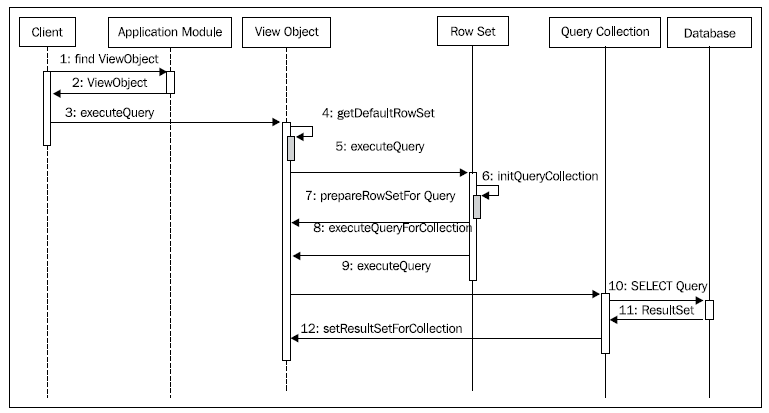
What happens when you execute an entity-based view object?

ViewObject vo = applicationModule.findViewObject("Departments");
vo.execute();//execute view object to fetch rows
Row row=vo.first();//Move to the first row in the row set
The following sequence diagram highlights how the business components interact
with one another to query the database:


Note : The above content is from : Jobinesh  : Oracle ADF Real World Developer Guide a fantastic book on ADF.

Just shared the above for reference to others.